
What these three things are, in plain words#
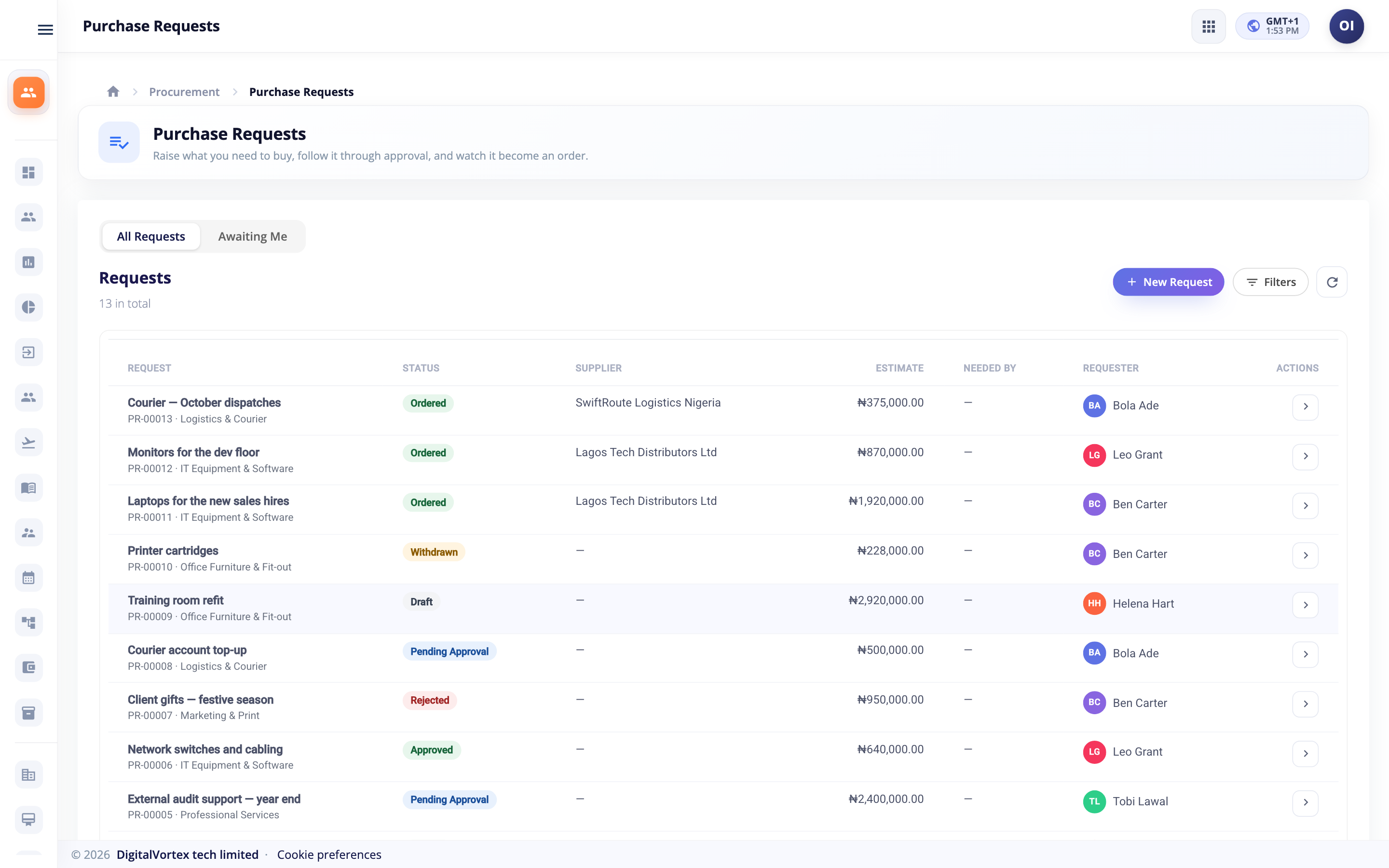
A purchase request is how a person says, "I need to buy this." It is a question, not an order. Nothing is bought until it is approved.
A contract is a deal you have already made with a supplier. It lists the prices you agreed. Sometimes it also sets a limit on how much you may spend.
A change order is how you change an order after it has been sent to the supplier.
You can read the big picture first in Procurement: how it works and how to set it up.
Raise a purchase request#
Anyone with a Procurement seat can raise a request.
- Open ProcurementPurchase RequestsPurchase Requests and click New Request.
- Under What do you need?, write a short title.
- Under Why is it needed?, say the reason.
- Pick a Category. It decides who approves the request and how it is bought.
- Pick a Cost centre, so Hubtoll knows whose budget it belongs to.
- Optionally pick a Preferred supplier (optional). Only approved suppliers are listed.
- Pick the Currency and a Needed by date.
- In the lines table, click Add Line. Fill in Item, Qty and Est. Price. The Line Total is worked out for you.
- Check the Estimated total.
- Click Create Request.
A few rules:
- A request can have up to 200 lines.
- Every quantity must be more than zero.
- If Finance is connected and you pick a foreign currency with no exchange rate, you are told when you submit: "There is no exchange rate for X yet...". Ask finance to set the rate in Sales and Finance.
The statuses#
| Status | What it means |
|---|---|
| Draft | You are still writing it. |
| Pending Approval | Waiting for approvers. |
| Approved | Approved. Nothing is ordered yet, or an order is being raised. |
| Rejected | An approver said no. You can edit and send it again. |
| In Sourcing | Gone out to suppliers for quotes. See Sourcing. |
| Ordered | A purchase order exists. |
| Withdrawn | You pulled it back while it waited. |
| Cancelled | Stopped before it was ordered. |
Withdraw or cancel#
- While a request waits for approval, click Withdraw. It leaves every approver's list straight away, and any held budget is let go.
- A Draft, Rejected, Approved or In Sourcing request can be cancelled with Cancel.
The budget check#
Before anyone approves, Hubtoll asks: "Is there enough budget left?"
The check works only when Finance is connected, and only for lines that have a ledger account. An account comes from the category's Default expense account, or from the item. It runs twice: when you submit, and again when the last approver says yes.
What happens depends on the policy setting When a request exceeds its budget:
| Setting | What you see |
|---|---|
| Off | No check. |
| Warn | A "Heads up" message. The request can still go on. |
| Block | The request is refused: "This would take a budget over what is left. ... Raise the budget, reduce the request or change its account." |
Lines with no ledger account cannot be checked. You will see: "Some lines have no ledger account, so they can't be checked against a budget."
On the request page, the Budget panel shows each account as Within budget, Over budget or No budget set. It also shows what is left, what was spent, what is on order and what other requests hold. An approved request holds its budget until a set date unless it is ordered first. The administrator picks that number of days in the policy.
What happens after approval#
When the last approver agrees, Hubtoll decides how the request is bought. It looks at the contract, the catalog, the supplier and the size of the request.
| Situation | What happens |
|---|---|
| The request is a call-off against a contract, with an approved supplier | It goes straight to an order. No quotes, whatever the size. |
| Every line comes from the catalog, with an approved supplier | It goes straight to an order. |
| The total is above the competitive sourcing threshold | It goes out for quotes and becomes In Sourcing. This is true even if you named a supplier. |
| A supplier is named, and the total is under the threshold | It goes straight to an order. |
| No supplier, and the total is under the threshold | It stays Approved. A buyer picks a supplier, then clicks Raise Order. |
The threshold comes from the category, or from the policy if the category has none. Big requests are compared using the company's main currency.
The order is a draft purchase order in Sales and Finance, for the supplier's vendor. If you need the full story of what comes next, read Buy: vendors, orders, bills and payments.
If Raise Order does not work#
| Message | What to do |
|---|---|
| "Choose the supplier to order from first" | Edit the request and pick a supplier. |
| "The supplier is X and can't be ordered from" | The supplier is not Approved. Fix that first. |
| "There is no exchange rate for X, so the order can't be priced. Set the rate in Sales & Finance." | Ask finance to add the rate. See Currencies and exchange rates. |
| A message saying Sales and Finance is not connected | An administrator must turn on the Procurement connection. See Procurement. |
Follow the order#
Once an order exists, the request page shows an Order panel with the purchase order number and its status. Four steps show how far it has gone: Ordered, Received, Billed and Paid. You see this without needing any Finance permission.
For what happens when the supplier's bill arrives, see Supplier invoices and bill matching.
Requests raised from a budget#
Some requests are not typed by hand. They are raised from an approved department budget. See Budget management.
These requests follow the budget. The lines and details cannot be changed on the request. You can only set the vendor and the project. If you want other changes, change the budget. Hubtoll says: "This requisition was raised from an approved departmental budget, so its lines and details follow the budget."
Contracts#
A contract does two jobs.
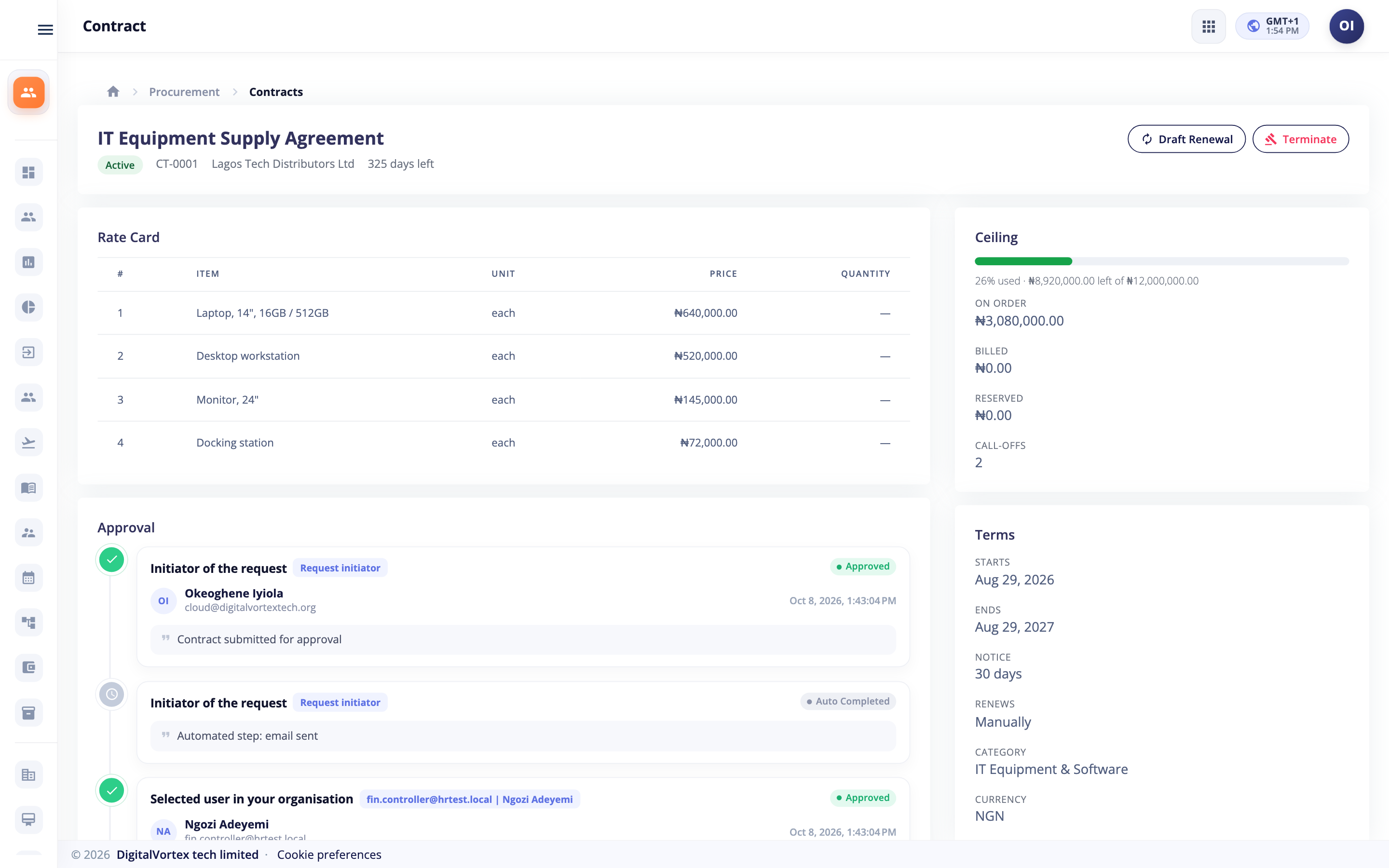
- It is the price authority. The rate card says what each item costs.
- If you give it a ceiling, it also acts like a blanket order: a pot of money you may spend from over time.
Create a contract#
- Open ProcurementContractsContracts and click the button to add a contract. The window is called New Contract.
- Fill in Title and Currency.
- Pick an approved Supplier and a Category.
- Set Runs From / To.
- Optionally fill in Ceiling (Optional). With a ceiling the contract is a blanket order. Without it, it is a price agreement only.
- Set Renewal Notice (Days) and write the Terms.
- Add lines to the rate card: Item, Unit, Price and Min Qty.
- Save, then click Submit For Approval.
To submit, the supplier must be approved. The contract needs at least one rate-card line or a ceiling, and a start date. If nobody has designed the contract approval chain you see: "No contract approval workflow is configured. Ask a procurement administrator to design one."
Contract statuses#
| Status | Meaning |
|---|---|
| Draft | Being written. |
| Pending Approval | Waiting for approvers. |
| Active | In force. Requests can buy from it. |
| Expired | The end date has passed. |
| Terminated | Ended early, with a reason. |
| Rejected | Approval refused. |
Buy from a contract (a call-off)#
On a purchase request, pick the contract under Call Off Against A Contract (Optional). Then:
- Prices come from the rate card. You cannot type your own.
- The supplier and currency come from the contract.
- The request skips sourcing, whatever its size.
- The amount counts against the ceiling.
The ceiling bar#
The contract page shows a bar for the ceiling. It shows ordered, billed and reserved. Hubtoll counts the larger of "ordered" and "billed", then adds what approved requests are reserving. Call-offs in a different currency are not counted, and the page says so.
When someone submits a request that would go over the ceiling, the policy setting When a contract ceiling would be exceeded decides:
- Warn: "Contract X has N CUR left under its ceiling, and this request is M."
- Block: the same message, plus "Reduce the request or ask for the contract ceiling to be raised."
End a contract#
Click Terminate and give a reason: "Say why the contract is being ended". No new call-offs can be made. Orders already placed carry on.
Renew a contract#
- Open the contract. A Renewal Due chip appears when it is close to its end. The days come from the policy.
- Click Draft Renewal.
- Hubtoll makes a new Draft. It starts the day after the old one ends, runs for the same length, and copies the rate card and terms.
- Change what you need, then click Submit For Approval.
The catalog#
The catalog is a ready-made price list of things you buy again and again, such as printer paper from one supplier.
- Open ProcurementCatalog and click New Item.
- Fill in Name and Code. The code must be different for each item from the same supplier.
- Pick an approved Supplier and a Category.
- Fill in Price, Currency and Unit, and add a Description if useful.
- Save.
On a request, click Pick from the catalog on a line. If every line comes from the catalog and the supplier is approved, the request goes straight to an order. The item's currency must match the request's currency.
You can edit an item, switch it off with Deactivate and on again with Activate, or delete it. An item that was ever used on a request cannot be deleted: "This item has been used on a request, so it can't be deleted. Deactivate it instead."
Change an order that has been issued#
An issued purchase order is never edited in place. Both you and the supplier have already seen it. So a change is its own record, with its own approval, and its own history.
- Open ProcurementChange OrdersChange Orders and click New Change Order.
- Pick the Purchase Order. Only issued, open orders are listed. A draft order is edited in Sales and Finance instead.
- Set a New Delivery Date if the date moves.
- For each line, type a New Qty and New Price, or mark the line to remove it. Click Add A Line to add a new one.
- Under Why Is It Changing?, give the reason.
- Save, then click the button to submit it.
The rules protect you from mistakes:
- One change at a time per order: "Another change to this order is already awaiting approval. Finish or cancel it first."
- A line cannot go below what was already received or billed: "Line N can't go below X: that much has already been received or billed".
- A line with goods received or billed cannot be removed.
- You must say why: "Say why the order is being changed."
- The change must alter at least one line or the date.
Does a change need approval?#
That depends on the policy setting Re-approval. The starting choice is Only above a threshold, so a small tweak goes through and a big one asks again. When approval is not needed, the page says: "No approval needed. Under your policy this change applies to the order as soon as you submit it."
Statuses#
| Status | Meaning |
|---|---|
| Draft | Being written. |
| Awaiting Approval | Waiting for approvers. |
| Approved | Approved. Not applied to the order yet. |
| Applied | The order in Sales and Finance now carries the change. |
| Declined | An approver said no. |
| Cancelled | Stopped. |
Who can do what#
| You want to | You need |
|---|---|
| Raise, edit and submit your own requests | A Procurement seat (PMS_MANAGEMENT_INITIATOR to be sure) |
| See every request | PMS_MANAGEMENT_READONLY, or higher |
| Start sourcing, raise orders, manage contracts, catalog and change orders | PMS_MANAGEMENT_EDITOR |
| Submit a request, contract or change order when no approval chain exists | PMS_SETTINGS_ADMIN |
| Approve | Nothing. Whoever the workflow names. |
See the full list in the Permission reference and learn how to give people these in Roles: give people the right access.
Common questions#
I cannot see the New Request button.
You need a Procurement seat. If you have one and still do not see it, ask an administrator to give you PMS_MANAGEMENT_INITIATOR. See Seats, plans and subscriptions.
Can I edit a request after I submit it?
Not while it waits for approval. If an approver rejects it or sends it back, you can edit it and submit it again. If you change your mind sooner, click Withdraw to pull it out of the approvers' lists.
Why did my request go out for quotes when I named a supplier?
Its total is above the competitive sourcing threshold. Big requests are always compared, even when you have a favourite supplier. A call-off against a contract is the exception.
Why does my approved request not have an order?
Check that a supplier is chosen and Approved, and that the Procurement connection is on. Then click Raise Order on the request.
How do I raise the price on an item in a contract?
Do not change an active contract. Draft a renewal, change the rate card there, and send it for approval.
What is the difference between a change order and editing the order?
A draft order can be edited freely in Sales and Finance. Once an order is issued, only a change order can alter it, so the supplier and your approvers always see a record of what moved.